How to Download & Install App P on Android and iPhone (2026)
The safest way to download App P is through the App P buttons on the OKEGOCUCI Download page: on Android the button downloads the installer file directly, and on iPhone it installs the app through the official install link. App P is a grid-style game and arcade app with a mobile-friendly design. This OKEGOCUCI guide walks you through installing on Android and iPhone, fixing common problems, and spotting fake files.
Before you start
- You must be 18 or older.
- Use Chrome on Android or Safari on iPhone.
- Make sure you have enough storage and a stable internet connection.
- Downloading and installing is free. You need an account ID from an official agent to log in.
How to install App P on Android
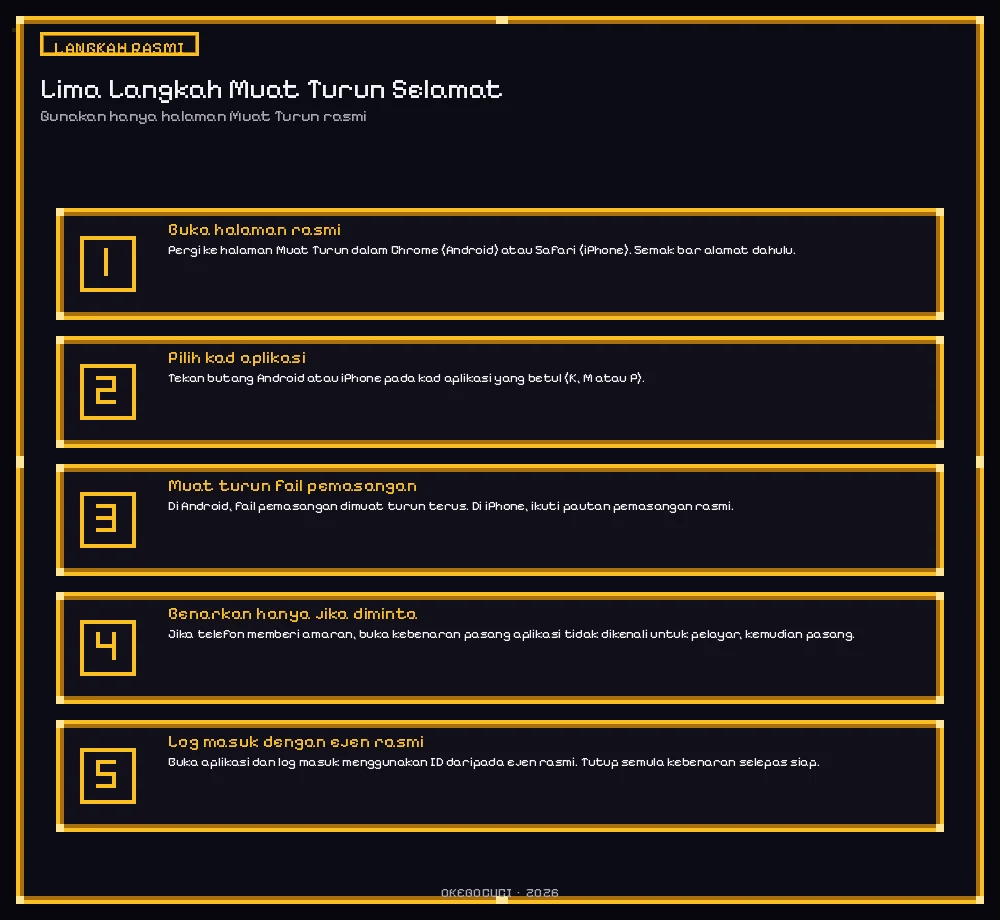
- Open the OKEGOCUCI Download page and tap the Android button on the App P card.
- The installer file downloads straight to your phone.
- If your phone shows a warning, allow "Install unknown apps" for your browser only if asked (Settings → Security / Install unknown apps).
- Open the downloaded file from the notification bar or your Downloads folder, then tap Install.
- Once done, you can switch the "unknown apps" setting back off for safety.
- Open App P and log in with the account ID from our agent.
How to install App P on iPhone
- Open the OKEGOCUCI Download page in Safari and tap the iPhone button on the App P card.
- Tap "Install" and wait for the icon to appear on your home screen.
- If the app doesn't open or shows a trust prompt, WhatsApp our customer service for help.
Common problems and fixes
- The button doesn't download anything: switch to Chrome (Android) or Safari (iPhone), check your connection and try again. Some install links only work on Malaysian networks.
- Install doesn't start on Android: check whether your phone is still waiting for "Install unknown apps" permission for your browser. Allow it, then open the installer file again.
- "App not installed": delete the old version of App P first, free up some storage, and download the latest file again from the OKEGOCUCI Download page.
- The app won't open on iPhone: WhatsApp our customer service for help.
- Forgot your ID or password: read the login help guide or WhatsApp our agent.
How to spot a fake App P installer file
- Only download from the OKEGOCUCI Download page or links sent by our official WhatsApp.
- Be wary of files asking for odd permissions such as SMS, contacts or banking.
- Never share your password or OTP code with anyone, including people claiming to be agents.
- Also read how to spot fake OKEGOCUCI accounts.
After installing
WhatsApp our agent to get your account ID. Before you start playing, set a budget and time limit first. See how to set your budget and play-time limits. Every game outcome is random and no winnings are guaranteed.
18+ only. OKEGOCUCI is entertainment, not a way to earn income. Set a budget and time limit, and stop when you reach it.
Contact OKEGOCUCI Official Channels
OKEGOCUCI, under KL KING PARTNERSHIP, helps customers with account IDs and installation. Contact us only via official OKEGOCUCI WhatsApp or Telegram @okegocucibot. Ignore download links sent from unknown numbers.
Related Reading
- OKEGOCUCI Download page
- How to Download & Install App K
- How to Download & Install App M
- Responsible Play Guide
FAQ
Is downloading App P free?
Yes. Downloading and installing App P is free. You need an account ID from an official agent to log in.
Why does my phone warn me when installing App P?
App P is installed directly from an install file rather than an app store, so your phone shows a warning. Only use the links on the OKEGOCUCI Download page.
App P won't open on my iPhone. What should I do?
WhatsApp our official customer service and an agent will help you.
The download link doesn't work. What should I do?
Use Chrome or Safari, check your connection and storage, then try again. Some links only work on Malaysian networks. If it still fails, WhatsApp our agent.
Who can use App P?
Only users aged 18 and over.